![Omapaja_logo_tunnus.png]](https://tuki.omapaja.fi/hs-fs/hubfs/LOGOT/Omapaja_logo_tunnus.png?height=40&name=Omapaja_logo_tunnus.png)
How to send an identical invoice automatically at a time of your choice
If you want to send your customer an invoice that repeats with the same content, you can easily set this up while creating the invoice.
Please note that if your invoice includes expenses, it cannot be set as a recurring invoice.
How to do it:
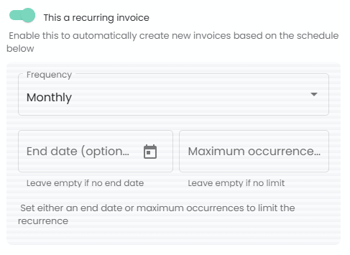
Select Recurring invoice.
Define how often the invoice will be sent automatically to your customer.
Then set either an end date or the maximum number of times the invoice will be sent.
After this, continue creating the invoice as usual and send it to us for review.
When you want to stop a recurring invoice, you need to do this from the original first invoice that started the recurrence.